PixelModel v1: The Model Is a Thumbnail Now
Last month we released PixelModel — a neural network whose weights are literally the pixels of a PNG. It was a toy: 202,752 parameters, welded to 32×32 output, trained on six solid-color swatches. It scored FID 566.84 on the Tiny-T2I-Leaderboard, mostly by producing the same yellow noise for every prompt.
Today we're releasing PixelModel v1. It is 8.5× smaller — 23,747 parameters — and it beats v0 on both benchmark metrics while being trained on 20,000 real MS-COCO caption/image pairs instead of six color swatches. The entire model now fits in a 160×149 PNG:
cherry on top 🍒
The model generates 600 images (cpu) in 5 (five) seconds. Thats 5000 images in 24 seconds on cpu. The model trained on cpu for just 30 minutes.
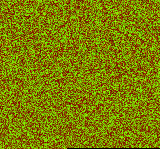
That image is not a visualization of the model. It is the model. All 23,747 weights, one per pixel.
How do you make it smaller AND better?
v0 had a dirty secret: 196,608 of its 202,752 parameters — 97% of the model — were one giant output matrix with one weight row per output pixel. The "neural network" part was tiny; the rest was a lookup table bolted to a fixed 32×32 canvas.
v1 replaces that output matrix with a coordinate-conditioned decoder (CPPN-style). Instead of storing weights per pixel, the decoder is a small MLP that answers one question: "given this prompt's latent vector and the coordinate (x, y), what color is here?"
prompt string
  → hashed char-trigram + word embedding (64-dim, 0 params)
  → T1 (80×64)+b → tanh
  → T2 (64×80)+b → tanh          = latent z

for every pixel (x, y):
  concat(z, fourier features of (x, y))
  → D1 (80×82)+b → tanh
  → D2 (80×80)+b → tanh
  → D3 (3×80)+b  → sigmoid  = RGB
Because pixels are computed from coordinates, the parameter count no longer depends on resolution. The same 23,747 weights render 64×64 natively, or 256×256, or anything else — --res 512 just works.
Three more upgrades
- Prompt embedding: v0 summed character codes — "red circle" and "circle red" collided. v1 hashes character trigrams and words (FNV-1a) into a 64-dim vector. Still deterministic, still zero parameters, but different prompts now get meaningfully different embeddings.
- 16-bit weights: v0 stored 8-bit magnitudes in R and wasted the G channel. v1 packs each weight across R (high byte) and G (low byte) — quantization error drops to ~3×10⁻⁵ per weight.
- Real data: 20,000 MS-COCO caption/image pairs at 64×64, hash-checked to be disjoint from the 5,000 evaluation images.
Training
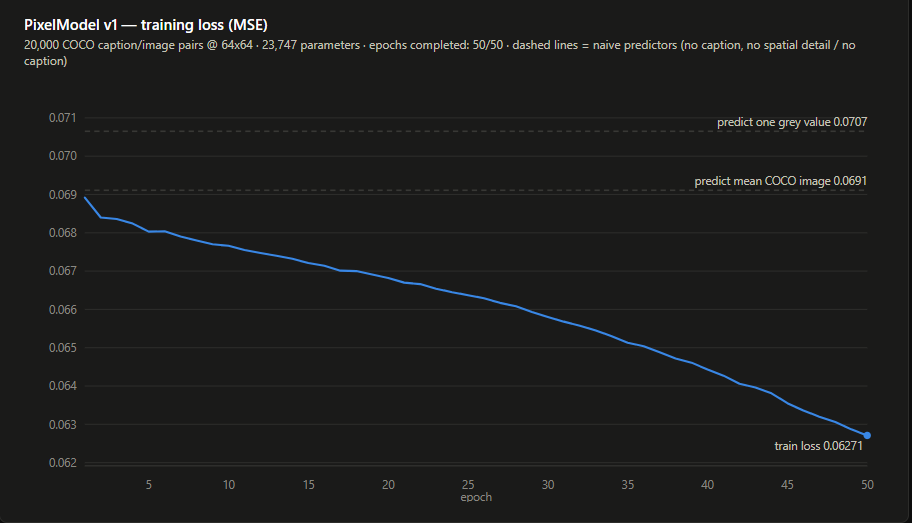
Training ran on CPU — the whole 50-epoch run over 20K images took 27 minutes. The dashed lines are the two "no-understanding" baselines: outputting one grey value forever (0.0707), and outputting the average COCO image forever (0.0691). The model crossed below the second one at epoch 4 and kept going — everything under that line is caption-conditioning, the part a text-to-image model actually gets judged on:
Honesty section
Here is what generation actually looks like — real training photo on the left, model output for the same caption on the right:
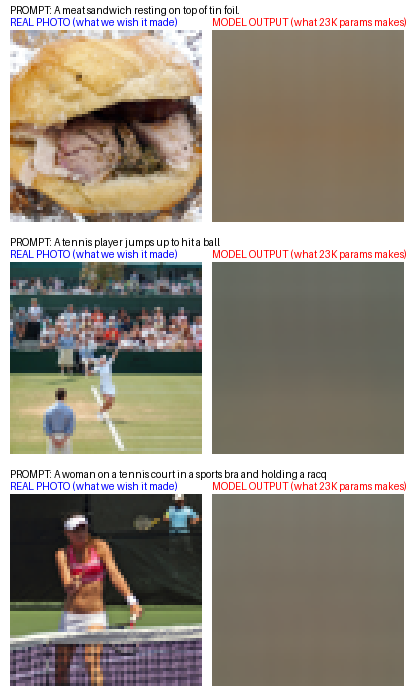
A 23K-parameter model does not draw sandwiches. With ~1 parameter per training image, the loss-minimizing behavior is to output the average of all plausible images for a caption — caption-conditioned color, light, and layout statistics. Food prompts come out warm and brown; sky prompts come out cool and bright. That is the ceiling for this size class, and we'd rather show it than crop around it.
Numbers
Measured per the leaderboard protocol: FID via torchmetrics.image.fid.FrechetInceptionDistance against MS-COCO val2014 (sayakpaul/coco-30-val-2014, 256×256 center-crop), CLIP Score via torchmetrics.multimodal.CLIPScore with openai/clip-vit-base-patch32, at the native 64×64 generation resolution, n=5000 (v0's numbers were n=40).
              v0          v1
params        202,752     23,747     (8.5× smaller)
FID    ↓      566.84      439.46
CLIP   ↑      18.60       20.02
native res    32×32       64×64 (resolution-free)
Smaller model, more general behavior, better scores, and the eval pipeline now ships inside the repo instead of living in a throwaway environment.
Try it
git clone https://huggingface.co/bench-labs/pixelmodel-v1
python INFERENCE.py "a red double decker bus"
python main.py "a beach with palm trees" --res 256 --scale 1
model.png is the canonical model; model.safetensors carries the same weights with the parameter count embedded in its header metadata. Check out the PixelModel v1 repository.
Still a toy. Slightly less useless. The model is literally a thumbnail.